~/devora — a new tab page for Chrome

Your new tab,
set up like your editor

Devora replaces Chrome’s New Tab page with widgets you pick and arrange: GitHub activity, coding streaks, tasks, notes, snippets and small dev tools. Themes, shortcuts and a command palette, like the tools you already use. Your data stays in your browser.

package
devora
version
1.0.0
runs in
chrome 116+, manifest v3
widgets
59
themes
21
account
not needed
tracking
none
price
free, all of it

fig. 1 live demo running in this page. type in the console, or click around.

Hello.

Tasksinbox · 3
  • high today
  • med thu
Contributionssample data
Focusready
25:00
01features

What’s in the box

Start from a preset or an empty grid. Every widget can be moved, resized, restyled, hidden or removed, from the mouse or the keyboard.

screens/
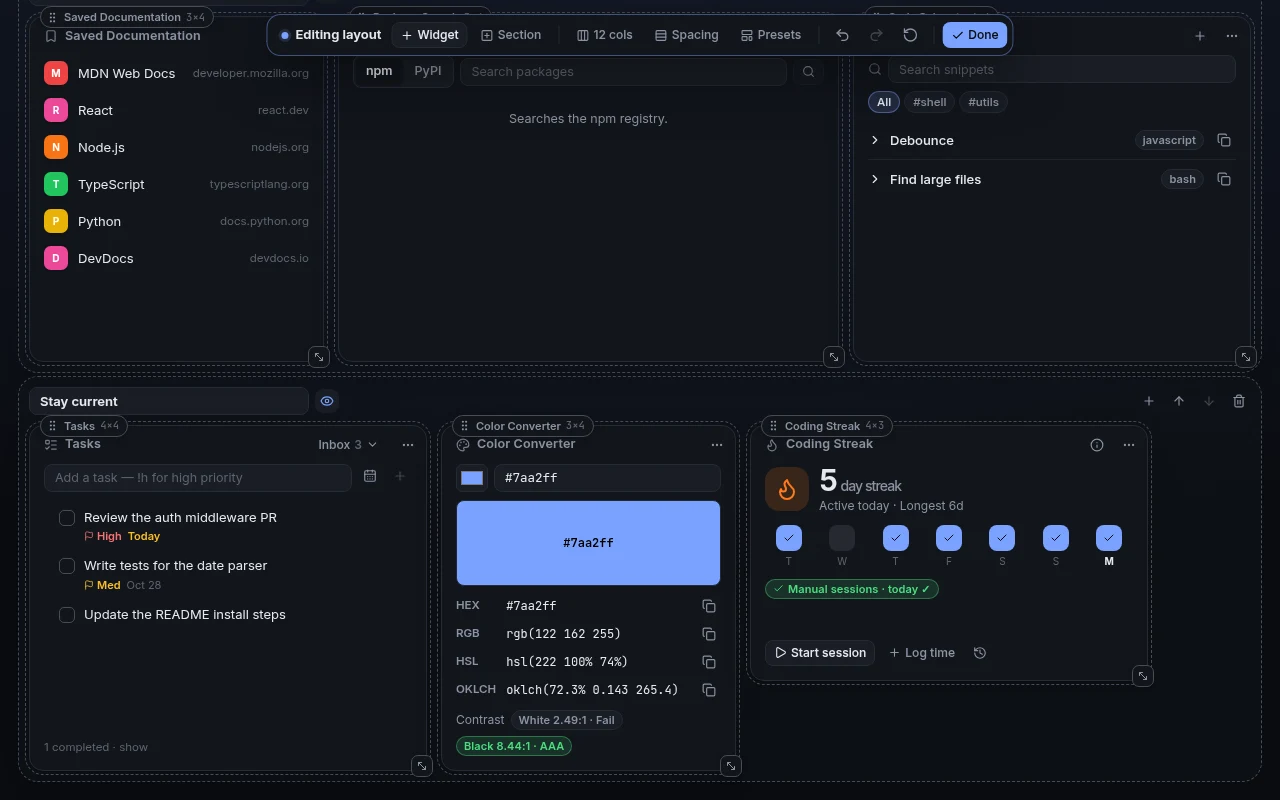
layout-editor.png1280 × 800
Devora layout editor with resize handles, sections and an editing toolbar
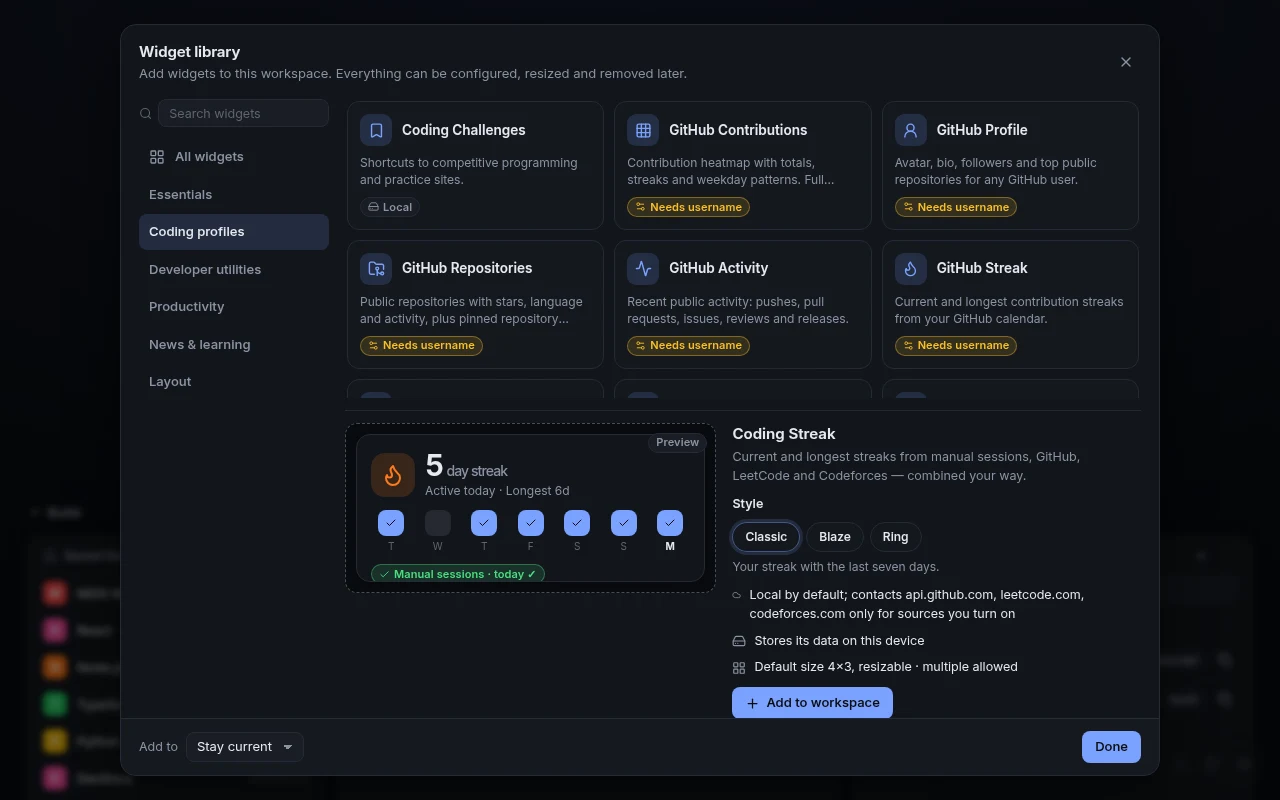
widget-library.png1280 × 800
Devora widget library showing coding widgets and a live preview of the Coding Streak widget
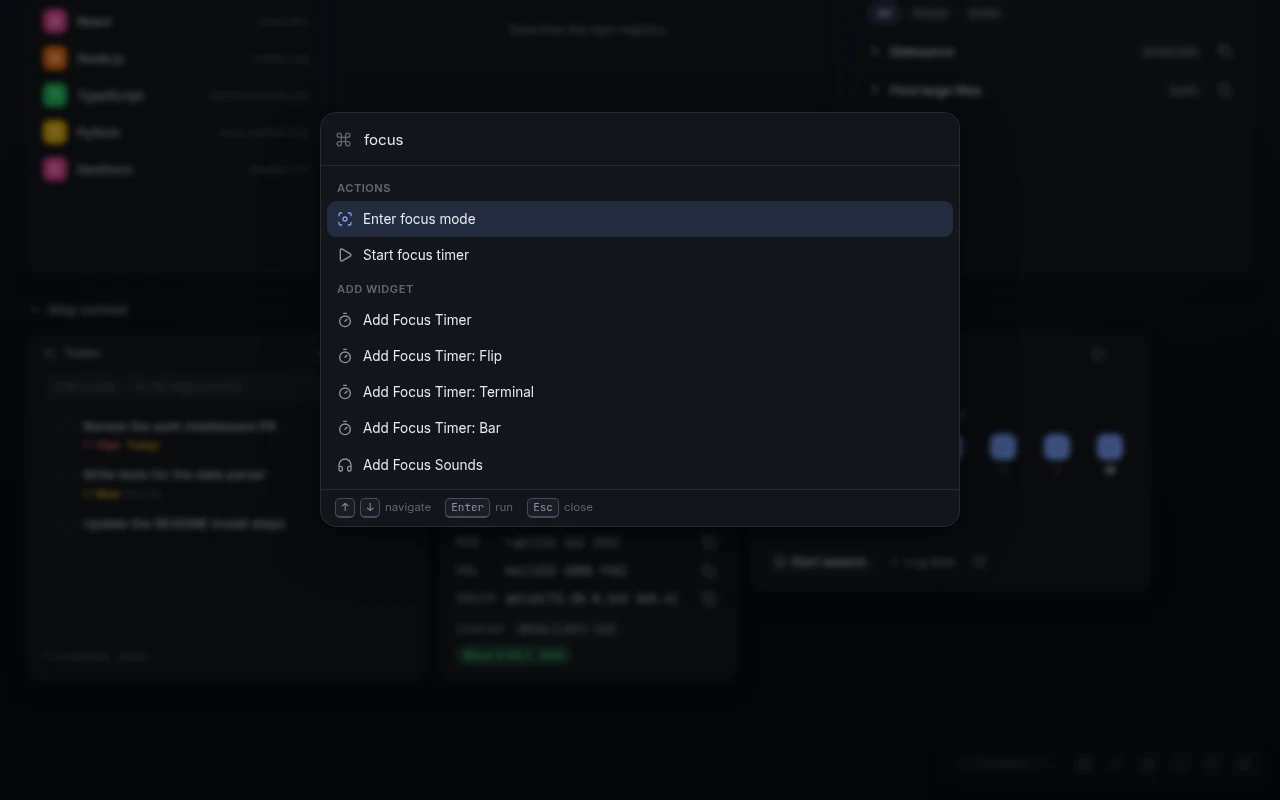
command-palette.png1280 × 800
Devora command palette searching for focus actions
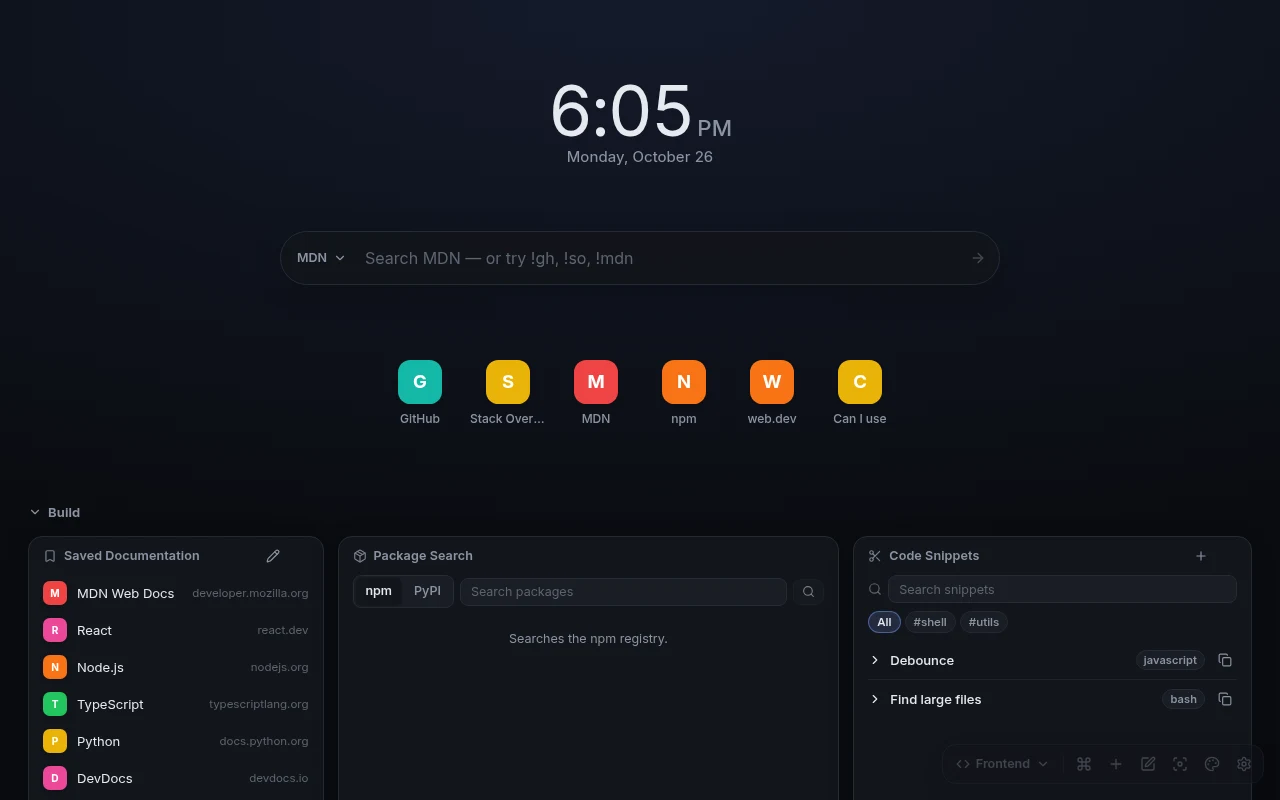
workspaces.png1280 × 800
A Devora Frontend workspace with documentation links, package search, snippets, tasks and a colour converter
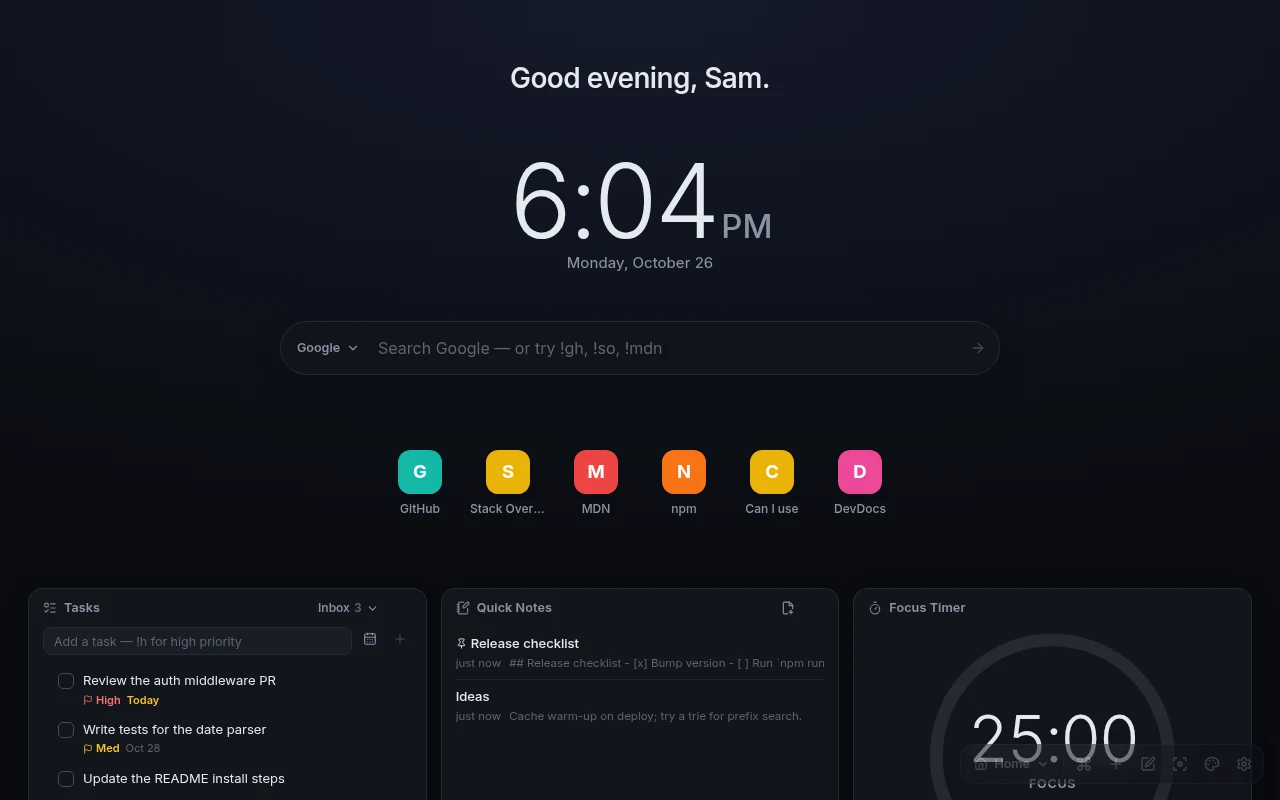
home.png1280 × 800
The Devora new tab with a greeting, clock, search bar, quick links, tasks, notes and focus timer
appearance
21 themes, light and dark that follow your system, and a theme editor that warns about low contrast. Fonts, gradients, wallpapers or your own image.
coding
Streaks, a daily coding goal and an activity heatmap that merge your own sessions with GitHub, LeetCode and Codeforces.
focus
Focus mode hides every widget you didn’t mark. The Pomodoro timer, stopwatch and countdowns stay right across reloads, tabs and sleep.
utilities
JSON formatter, regex tester, UUIDs, Base64, URL and timestamp tools, colour converter, HTTP and Git references, snippets.
backup
Export everything to one file, import it on another machine. Devora keeps recovery copies before migrations and imports.
keyboard
Drag, resize and reorder without a mouse. High-contrast themes and reduced motion are built in.
02widgets

59 widgets, all free

Add as many as you like. Each one says up front whether it works offline or needs to call a service. Press / to filter.

widgetwhat it doescategorydata
ClockDigital clock, 12/24-hour, seconds, any time zone. 14 styles.essentialslocal
Analog ClockA clock face for any time zone. 9 styles.essentialslocal
SearchGoogle, DuckDuckGo, GitHub, Stack Overflow, MDN, npm, PyPI, !bangs. 6 styles.essentialslocal
Quick LinksMost-used sites as icons, a list or chips. Imports bookmarks.essentialslocal
Bookmark GroupTitled groups of links, or import a bookmarks file.essentialslocal
CalendarMonth view, today highlighted, optional week numbers.essentialslocal
GreetingA time-of-day greeting with your name.essentialslocal
Text & MarkdownAny text, rendered safely as Markdown.essentialslocal
WeatherConditions and forecast from Open-Meteo. No location permission.essentialsnetwork
World ClocksYour team’s cities: time, day or night, working hours, difference.essentialslocal
GitHub ContributionsHeatmap with totals, streaks and weekday patterns.codingnetwork
GitHub ProfileAvatar, bio, followers and top public repositories.codingnetwork
GitHub RepositoriesRepositories with stars, language and activity.codingnetwork
GitHub ActivityPushes, pull requests, issues, reviews and releases.codingnetwork
GitHub StreakCurrent and longest contribution streaks.codingnetwork
Codeforces StatsRating, rank, history and solved problems.codingnetwork
LeetCode StatsSolved by difficulty, contest rating, recent accepted.codingopt-in
LeetCode Daily ChallengeToday's problem, or a shortcut to it.codingopt-in
Coding StreakStreaks from your sessions, plus GitHub, LeetCode, Codeforces if you add them.codinglocal
Daily Coding GoalA daily target in minutes, sessions, contributions or submissions.codinglocal
Developer Activity CalendarOne heatmap for all your coding activity.codinglocal
Coding ChallengesShortcuts to competitive programming sites.codinglocal
JSON FormatterValidate, pretty-print, minify, sort. Exact error locations.utilitieslocal
Regex TesterLive match highlighting and capture groups.utilitieslocal
UUID GeneratorRFC 9562 UUIDs, v4 or v7, in bulk.utilitieslocal
Base64 EncoderBase64 and Base64URL with full UTF-8.utilitieslocal
URL EncoderPercent-encode, decode, inspect query parameters.utilitieslocal
Timestamp ConverterUnix s/ms to dates and back, any time zone.utilitieslocal
Color ConverterHEX, RGB, HSL, OKLCH, with WCAG contrast.utilitieslocal
HTTP Status CodesSearchable reference of every status code.utilitieslocal
Git Quick ReferenceEveryday Git commands, one-click copy.utilitieslocal
Package SearchSearch npm, look up PyPI packages.utilitiesnetwork
Docs & Q&A SearchMDN and Stack Overflow, answers inline.utilitiesnetwork
Code SnippetsSave, tag, search and copy snippets.utilitieslocal
JWT DecoderHeader, claims and expiry. Decoded on your device, never saved.utilitieslocal
TasksLists, priorities, due dates, filters, sorting.productivitylocal
Quick NotesSearchable Markdown notes.productivitylocal
ScratchpadPlain text that saves as you type.productivitylocal
Kanban BoardDrag cards, or move them with the keyboard.productivitylocal
Focus TimerPomodoro cycles, accurate across reloads and tabs.productivitylocal
StopwatchLaps that keep running when the tab is closed.productivitylocal
Countdown TimerA countdown with quick presets.productivitylocal
Countdown to DateDays and hours until a launch or deadline.productivitylocal
Daily GoalsA few things to finish today, with carry-over.productivitylocal
Habit TrackerDaily check-offs and per-habit streaks.productivitylocal
Recent ProjectsRepo, local dev and docs links per project.productivitylocal
RemindersOne-off or daily, optional system notifications.productivitylocal
Learning ProgressCourses, books and tutorials with progress.productivitylocal
Time ProgressDay, week, month and year as bars, rings or a year of dots.productivitylocal
Focus SoundsRain, ocean and noise made in your browser, with a sleep timer.productivitylocal
Hacker NewsFront page, newest, Ask HN or Show HN.newsnetwork
RSS ReaderRSS and Atom feeds as plain text.newsnetwork
Developer NewsA curated set of engineering blogs.newsnetwork
Daily Programming ConceptOne concept a day with an example. Offline.newslocal
Saved DocumentationShortcuts to the docs you read every day.newslocal
Learning ResourcesCourse and learning-path shortcuts.newslocal
HeadingA title for part of your dashboard.layoutlocal
DividerA horizontal rule, optionally labelled.layoutlocal
SpacerEmpty space you resize like any widget.layoutlocal

local works offline, stores on your devicenetwork calls the named service once you set it upopt-in off until you turn it on in Settings

03themes & styles

21 themes, 59 widget styles

From terminal green to plain black and white. Tweak a built-in theme or write your own in the editor, which checks contrast as you go.

  • devora-dark#7aa2ff · dark
  • devora-light#3b5bdb · light
  • midnight#8ab4ff · dark
  • graphite#f5a524 · dark
  • fjord#88c0d0 · dark
  • paper#b4441a · light
  • terminal#39ff88 · dark
  • minimal#ffffff · dark
  • high-contrast-dark#ffd60a · dark
  • high-contrast-light#0033cc · light
  • noir#ffffff · dark
  • ink#0a0a0a · light
  • nightshade#c792ff · dark
  • neo-tokyo#5ce1ff · dark
  • mocha#f4b8d4 · dark
  • ember#ff9d42 · dark
  • synthwave#ff4fb8 · dark
  • evergreen#86d9a5 · dark
  • abyss#2fe0d0 · dark
  • latte#7c4ddb · light
  • sakura#b52f63 · light
zsh

~ $ ls widgets/clock/styles

classicboldstackedwordsgradientoutlineneoneditorialglassskyflipdot-matrixterminalbinary

~ $ ls widgets/analog-clock/styles

classicminimalstationluxeromanbauhausgloworbitrings

~ $ ls widgets/search/styles

classicminimalcompactspotlightmulti-searchterminal

~ $ ls widgets/greeting/styles

classictypewriterterminalgradienteditorial

~ $ ls widgets/calendar/styles

monthposterweek

~ $ ls widgets/countdown/styles

classicflipposter

~ $ ls widgets/focus-timer/styles

ringflipterminalbar

~ $ ls widgets/time-progress/styles

barsringsdots

~ $ ls widgets/stopwatch/styles

classicflipterminal

~ $ ls widgets/quick-links/styles

standarddockcards

~ $ ls widgets/weather/styles

classicposterlive-sky

~ $ ls widgets/coding-streak/styles

classicblazering

04privacy

There’s no server to send your data to

Layouts, tasks, notes and snippets are stored in your browser profile. This is every host the extension can talk to, and what makes it do so. Nothing on this list happens until you set it up.

networkall hosts
  • api.github.coma GitHub widget has a usernameusername, your token if saved
  • codeforces.coma Codeforces widget has a handlehandle
  • leetcode.comyou opt in and grant permissionusername, no cookies
  • hn.algolia.coma Hacker News widget is on screenthe feed requested
  • *.open-meteo.comyou set up a Weather widgetplace name, coordinates
  • registry.npmjs.org, pypi.orgyou search packagesyour query
  • api.stackexchange.comyou search Stack Overflowyour query
  • feeds you addyou allow that one sitea request for the feed

8 hosts0 requests to Devora. There is no Devora server.

manifest.jsonpermissions only
1{
2  "permissions": ["storage", "alarms"],
3  "optional_permissions": ["notifications", "favicon"],
4  "optional_host_permissions": [
5    "https://leetcode.com/*",
6    "https://*/*"
7  ]
8}
  • Two permissions at install: storage and alarms. No site access.
  • Optional ones are asked for only when you turn a feature on, and can be revoked.
  • Your GitHub token stays on this device and only goes to api.github.com.
  • No remote code. Everything ships inside the extension package.
  • Read the privacy policy
05faq

README.md

Is it actually free?

Yes, all of it: 59 widgets, 59 widget styles, 21 themes, workspaces, integrations and backups. No account, no subscription, no in-app purchases.

Does Devora collect anything?

No. There is no Devora server. Your data lives in your browser profile, and widgets only call the services you set them up with.

Which browsers?

Google Chrome 116 or newer, on desktop.

Another computer?

Export your setup from Settings → Data & backup and import it there. There’s no cloud sync, on purpose.

I found a bug.

Tell us on the contact page. Devora version and Chrome version help a lot.

Can I suggest a widget?

Yes. Write in from the contact page and say what you’d use it for.

esc
↑↓ move↵ open